 Gadgets & Accessories
 Desktop & Laptop
 Tablets & Accessories
 Camera & Networking
 Home Appliances
 Lifestyle & Travel
 Groceries
2%
ছাড়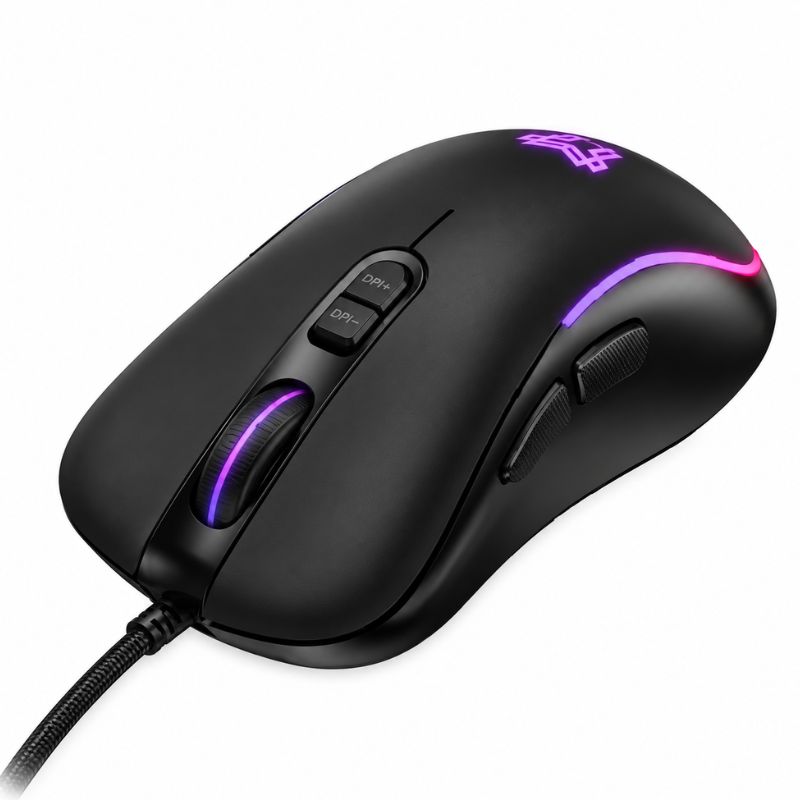
Hoco GM601 Grandeza Wired Gaming Mouse
৳900
৳880
প্রোডাক্ট কোড: P0310 স্টকে আছে
Product Type: Physical
বিস্তারিত
Hoco GM601 Grandeza Wired Gaming Mouse Overview
The Hoco GM601 Grandeza Wired Gaming Mouse is a sleek, performance-driven peripheral engineered for gamers and power users who demand precision and style without breaking the bank. Designed with an aggressive, ergonomic shell that comfortably supports the natural curve of your hand, this mouse ensures you stay focused during intense, hours-long gaming sessions. Constructed from durable ABS material, it strikes the perfect balance between a lightweight feel and sturdy build quality.
At its core, the GM601 Grandeza is powered by a reliable optical sensor capable of reaching up to 3600 DPI, giving you complete control over your cursor speed in fast-paced shooters or detailed design work. Complete with a versatile 7-button layout for quick actions, dynamic rainbow RGB lighting to illuminate your battle station, and a zero-latency wired USB connection, it delivers everything you need for a competitive edge. If you are exploring dependable computer peripherals, you can also browse more gaming mice available at Jabotio.com.bd.
High-Precision Optical Sensor
Never miss a crucial shot. The mouse is equipped with a high-performance A603EP optical chip that delivers smooth, accurate tracking across almost any mousepad surface. It features a dedicated on-the-fly DPI adjustment button, allowing you to instantly cycle through four distinct sensitivity levels: 1200, 1800, 2400, and 3600 DPI. Whether you need slow, pixel-perfect aim for sniping or rapid movement for sweeping across the map, the perfect speed is just a click away.
7-Button Gaming Layout
Take full control of your gameplay and productivity. The GM601 features a highly functional 7-button design. Alongside the standard left-click, right-click, and textured scroll wheel, it includes quick-access side buttons for forward/backward web navigation or in-game keybinds, plus the dedicated DPI toggle. This layout keeps your most important commands resting naturally right under your fingers.
Dynamic Rainbow RGB Lighting
Set the perfect mood for your gaming setup. The mouse boasts a built-in dynamic rainbow lighting effect. The vibrant LED illumination pulses and glows through the sleek cutouts and logo on the mouse shell, creating an immersive, eye-catching aesthetic that perfectly complements RGB keyboards and customized PC builds in low-light environments.
Ergonomic and Durable Design
Play in comfort, even during marathon sessions. Crafted from tough, impact-resistant ABS plastic, the GM601 is sculpted to support palm and claw grip styles alike. Weighing in at just 115 grams and measuring 122 × 66 × 41 mm, it feels incredibly nimble yet substantial enough for precise control.
Zero-Latency Wired Connection
Experience uninterrupted performance. Designed for competitive gaming where every millisecond counts, the mouse utilizes a reliable 1.4-meter wired USB connection. This ensures a stable, lag-free link to your desktop or laptop without the interference or battery concerns associated with wireless mice.
Hoco GM601 Specifications
| General | |
|---|---|
| Brand | Hoco |
| Model | GM601 (Grandeza Series) |
| Product Type | Wired RGB Gaming Mouse |
| Color | Black |
| Performance & Features | |
| Sensor Chip | Ernst A603EP Optical Sensor |
| Adjustable DPI | 1200 / 1800 / 2400 / 3600 DPI |
| Number of Buttons | 7 Buttons |
| Lighting Effect | Dynamic Rainbow RGB Illumination |
| Build & Connectivity | |
| Connection Type | Wired USB Type-A |
| Cable Length | 1.4 Meters |
| Material | High-Quality ABS Plastic |
| Dimensions | 122 × 66 × 41 mm |
| Net Weight | 115g |
What’s in the Box?
- Hoco GM601 Grandeza Wired Gaming Mouse
- User Manual
Frequently Asked Questions
Do I need to install any software or drivers to use this mouse?
No, the Hoco GM601 features a plug-and-play design. You simply plug the USB cable into an available port on your Windows PC, laptop, or Mac, and it will be recognized and ready to use immediately without any complicated software downloads.
How do I change the speed of the mouse cursor?
You can adjust the tracking speed instantly by pressing the dedicated DPI button located just below the scroll wheel. Pressing it will cycle the optical sensor through its four preset sensitivity levels: 1200, 1800, 2400, and 3600 DPI.
What do the buttons on the side of the mouse do?
By default, the two buttons located on the left side of the mouse act as “Forward” and “Backward” navigation keys, making it incredibly fast to browse web pages or document folders. In many PC games, you can also rebind these keys in the game’s settings menu to trigger specific actions, like throwing a grenade or using a health pack.
Is this mouse suitable for left-handed users?
While the general shape of the mouse is relatively symmetrical, the two side navigation buttons are situated on the left side, which are designed to be easily clicked by a right-handed user’s thumb. Left-handed users can still use the mouse, but reaching the side buttons may be less convenient.
Hoco GM601 Grandeza Wired Gaming Mouse Price in Bangladesh
The Hoco GM601 Grandeza Wired Gaming Mouse Price in Bangladesh may vary depending on current stock availability, import batches, and promotional offers. Check the price shown on this product page for the latest available price at Jabotio.com.bd.
Buy the Hoco GM601 Grandeza Wired Gaming Mouse from Jabotio.com.bd and enjoy a convenient way to shop for authentic computer gaming accessories with delivery across Bangladesh.
For more options, explore our complete collection of gaming Mouse, or discover more Hoco products in Bangladesh.
Customer Reviews (0)
This product has no reviews yet.
Be the first one to write a review.
Recently Viewed
No recently viewed products yet.